Boost campaigns let you apply a factor to the points customers earn during a specific window. Use them for moments like double-points weekends, VIP tier acceleration, launch events, or in-store campaigns where you want customers to act now.
Go to Campaigns -> Boosts to create and manage them.
What a Boost Can Affect 
A boost can affect points, tier points, or both.
Apply a factor to the points that go into the customer's balance.
For example, a 2x factor on purchase points turns a 10-point purchase earn into 20 points.
If the customer's tier factor is configured to apply to tier balance and points, it also applies to points earned during the boost. The calculation is sequential: base points × boost factor × tier factor. For example, 10 base points with a 2x boost factor and a 1.5x tier factor credits 30 points. With tier balance only, the same boost credits 20 points.
Apply a factor to the points that count toward the customer's tier balance.
For example, a 2x tier-points factor helps customers reach higher tiers faster without changing how many points they receive by itself. Tier points combine the boost factor with the customer's tier factor.
Run a boost that applies factors to points and tier points at the same time. You can use the same factor for both, or set different factors for each.
Tier-points factors are independent from points factors. A points factor does not automatically increase tier points unless you also add a tier-points factor.
Choose Earning Flows and Sales Channels 
You decide what earns extra points and where the boost is available. These are separate settings:
| Option | Use it when |
|---|---|
| All earning flows | Every earning flow should use the same factor during the boost. |
| Per earning flow | Only specific earning flows should be boosted, or each earning flow needs a different factor. |
| Manual / API points | Points credited manually, through the public API, or through Shopify Flow should be boosted. |
| Tier points | Customers should earn tier points faster during the boost. |
Available earning flows include purchases, social follows, profile completion, account verification, card installation, referrals, store check-ins, offer clicks, custom earning flows, and manual/API points.
Currency-based VIP tiers can use a campaign-wide tier-points factor. Per-earning-flow tier-points factors are available for points-based VIP tiers.
Sales channel availability 
Use Availability to choose where the boost applies for Shopify orders:
| Availability | What it means |
|---|---|
| Available everywhere | The boost can apply to Online Store, web, POS, and other eligible orders. |
| Online Store | The boost applies only to online and web orders. |
| Point of Sale | The boost applies only to Shopify POS orders. You can include every POS location or select specific locations. |
Sales channel availability is different from earning flows. For example, you can boost the purchase earning flow only for Point of Sale orders from selected store locations.
Create a Boost 
Name the boost
Choose a clear name, such as Black Friday 2x Points or Weekend Tier Accelerator. This name helps your team identify the campaign later.
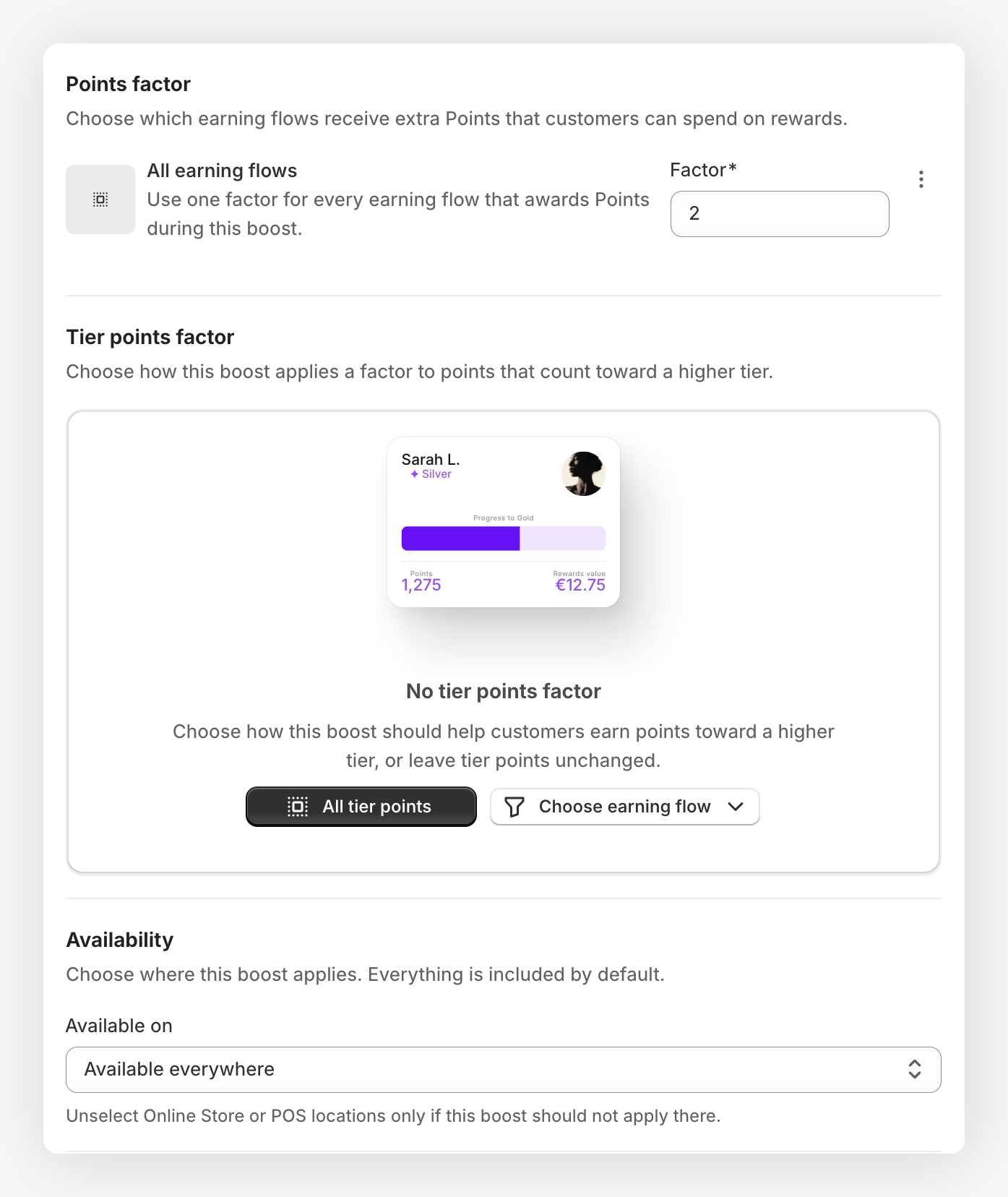
Set the points factor
Choose All earning flows to apply one factor to every earning flow, or Per earning flow to add specific earning flows.
Enter the points factor. For example, 2 means customers earn double points. Values below 1 reduce earnings during the window.
Set the tier-points factor
If VIP tiers are active, choose whether the boost should also apply a factor to tier points.
Enter the tier-points factor. Use All tier points for one campaign-wide factor, or choose specific earning flows when your tier setup supports it.
Choose the sales channel availability
Open Available on and leave Available everywhere selected, or limit the boost to Online Store or Point of Sale.
For POS-only boosts, choose all POS locations or select the specific Shopify POS locations where the boost should run.
Choose the timing
Pick One-time for a single campaign window, or Recurrence for repeating boosts.
Recurring boosts can run every day or only on selected weekdays. You can also limit them to a time range, such as 17:00 to 20:00.
Review the summary
Use the summary card to confirm where the boost applies and what customers will earn from a 100-point example.
Save
Click Save. The boost starts when its timing window begins.
Timing and Overlap Rules 
Boost timing uses the program timezone.
- One-time boosts run between the start and end date you choose.
- Recurring boosts repeat on selected days and optional hour ranges.
- Boosts that have already started cannot be edited. Duplicate the boost if you need a new version.
- You can archive a boost to stop it from applying in the future.
Two active boosts can run at the same time only when their earning flows and sales channel availability do not overlap. For example, an Online Store boost and a POS-location boost can share the same timing. If the timing and availability overlap, JeriCommerce asks you to adjust the timing or merge the channels into the existing boost.
What Customers See 
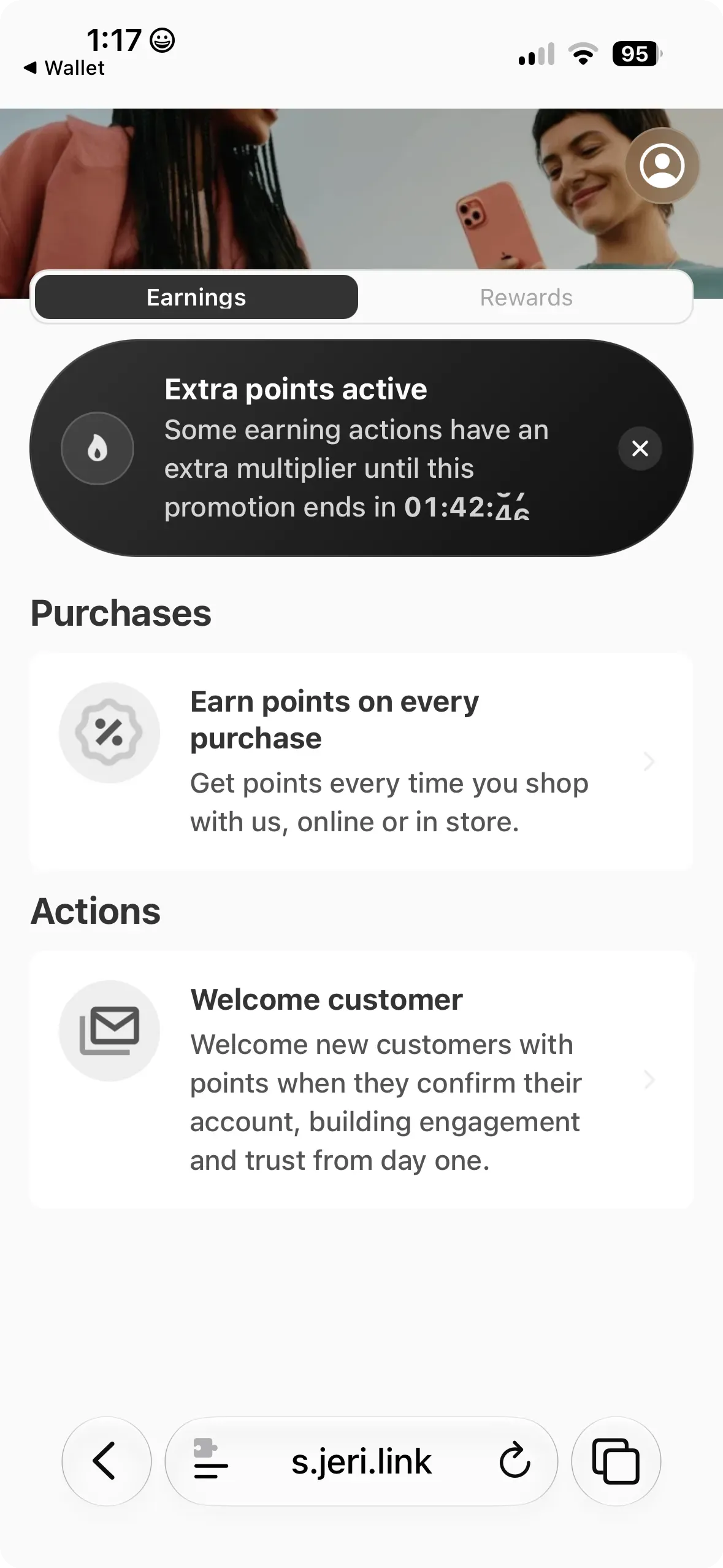
Active boosts appear where customers decide to earn points.
- The loyalty app can show a boost banner on earning flows.
- Individual earning-flow cards can show the active factor and countdown.
- Referral and tier pages show boosted amounts when a relevant boost is active.
- Shopify product and cart points blocks can show a boost badge and the boosted points amount.
- The storefront and customer account Loyalty Hubs show active boost banners, factor labels, and when the promotion ends.
- Loyalty Hub earning actions and tier points show the boosted values that apply to the customer.
Use short campaign windows and clear names. A boost works best when customers can understand the offer quickly, such as "2x points this weekend."
Refunds and Tier Points 
Boosted purchase points remain safe when an order is refunded.
If a customer returns part or all of a boosted purchase, JeriCommerce removes the proportional boosted points. Tier points are adjusted with the same boost factor that applied to the original purchase, so partial refunds stay balanced.
Boost campaigns are ready for short-term earning promotions, tier acceleration, and high-impact launch moments.