JeriCommerce submits usage charges monthly on your subscription anniversary. The charge is calculated from usage in the latest 30 days, so the usage window and the charge date are separate. Your Shopify subscription invoice may follow a different schedule.
Billing Cycle 
Your JeriCommerce usage charge is submitted on the day of the month your subscription was created. For example, a subscription created on March 15 is charged on April 15. The charge uses activity from the latest 30 days, which may not match the calendar dates between charges.
If a month does not have your anniversary date, the charge is submitted on that month's last day. For example, a subscription created on the 31st is charged on February 28, or February 29 in a leap year.
Loyalty Card Pricing 
Your wallet pass bill is based on the highest number of installed loyalty cards at any point during your 30-day billing cycle. JeriCommerce takes a daily snapshot of your active cards and bills for the peak count.
Each plan includes a base number of free passes. If you go over that limit, extra passes are billed in blocks of 1,000:
| Plan | Recurring base | Included passes | Overage rate |
|---|---|---|---|
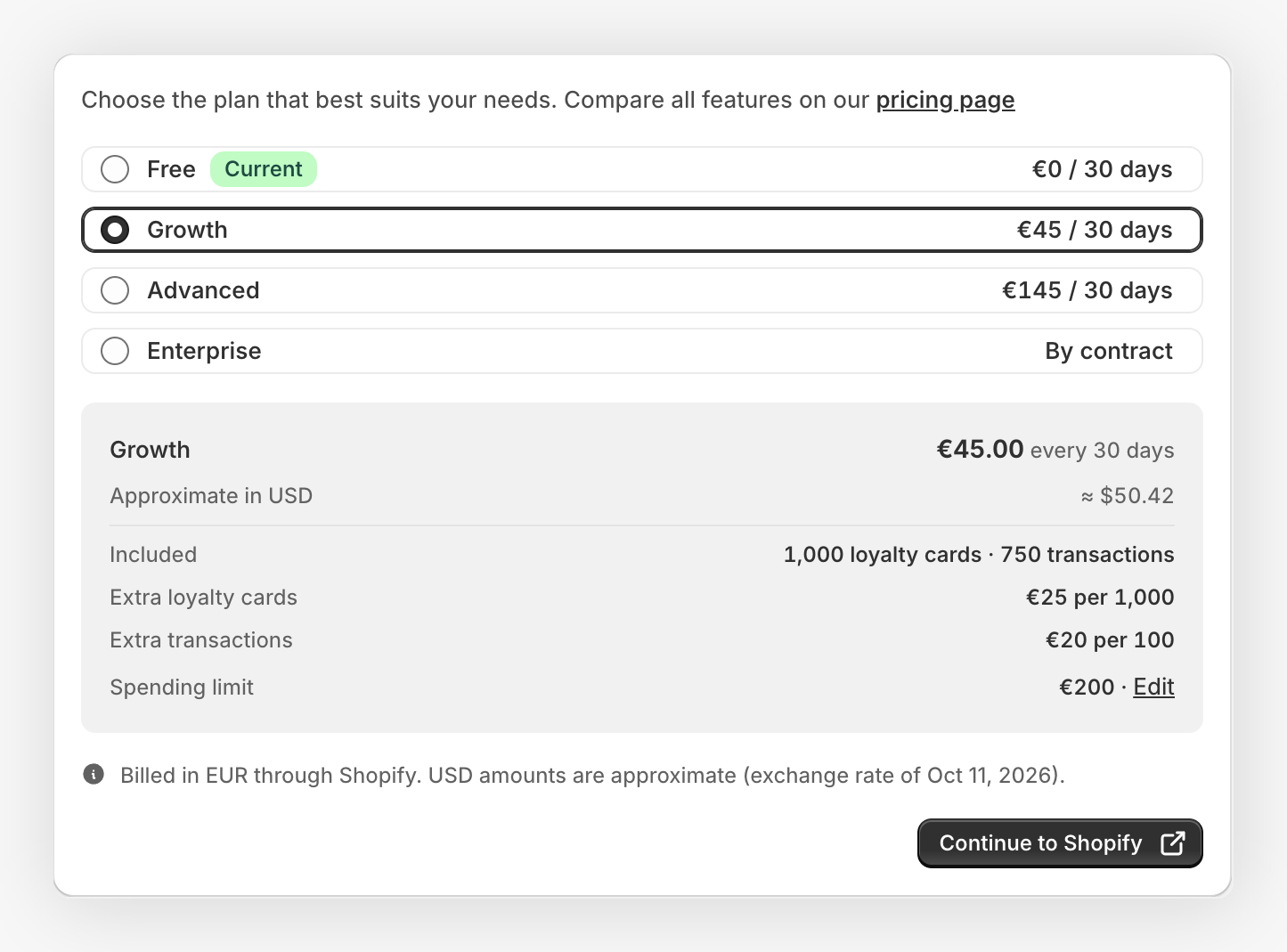
| Growth | €45 | 1,000 | €25 per 1,000 passes |
| Advanced | €145 | 1,500 | €25 per 1,000 passes |
| Enterprise | Custom | Custom | Volume discounts available |
Loyalty cards that are uninstalled bring your active count down. Since billing is based on the peak count during the cycle, uninstalls after a spike won't reduce that cycle's bill — but they will lower future cycles.
Billing Examples 
Example: Steady growth (Growth Plan)
- Your peak active passes during the cycle: 1,800
Bill: The first 1,000 are included. The remaining 800 trigger 1 block of 1,000 passes → €25 overage.
Example: Spike then uninstalls (Growth Plan)
- Day 5: You hit 1,500 active passes (peak)
- Day 20: 300 passes uninstalled, bringing the count to 1,200
Bill: Based on the peak of 1,500. The first 1,000 are included, the remaining 500 trigger 1 block → €25 overage.
Example: Under the limit (Advanced Plan)
- Your peak active passes during the cycle: 1,400
Bill: All 1,400 are within the 1,500 included passes → no overage.
Transaction Pricing 
If you use JeriCommerce's built-in loyalty engine to manage points, rewards, and tiers, your bill also includes a fee based on identifiable transaction volume for the billing cycle.
Transaction fees only apply when JeriCommerce is your primary loyalty platform. If you use an external provider like LoyaltyLion, Smile.io, or Yotpo and only use JeriCommerce for wallet passes, you are not charged for transactions.
What counts as a billable transaction? 
JeriCommerce counts identifiable transactions: balance change events linked to an identified customer. This includes points earned from purchases, manual balance changes, POS balance changes, Shopify Flow or API balance changes, refunds, and corrections that change the customer's balance.
Reward redemptions are not counted as billable transactions. Anonymous guest activity that is not linked to a loyalty program customer is not counted.
Pricing by plan 
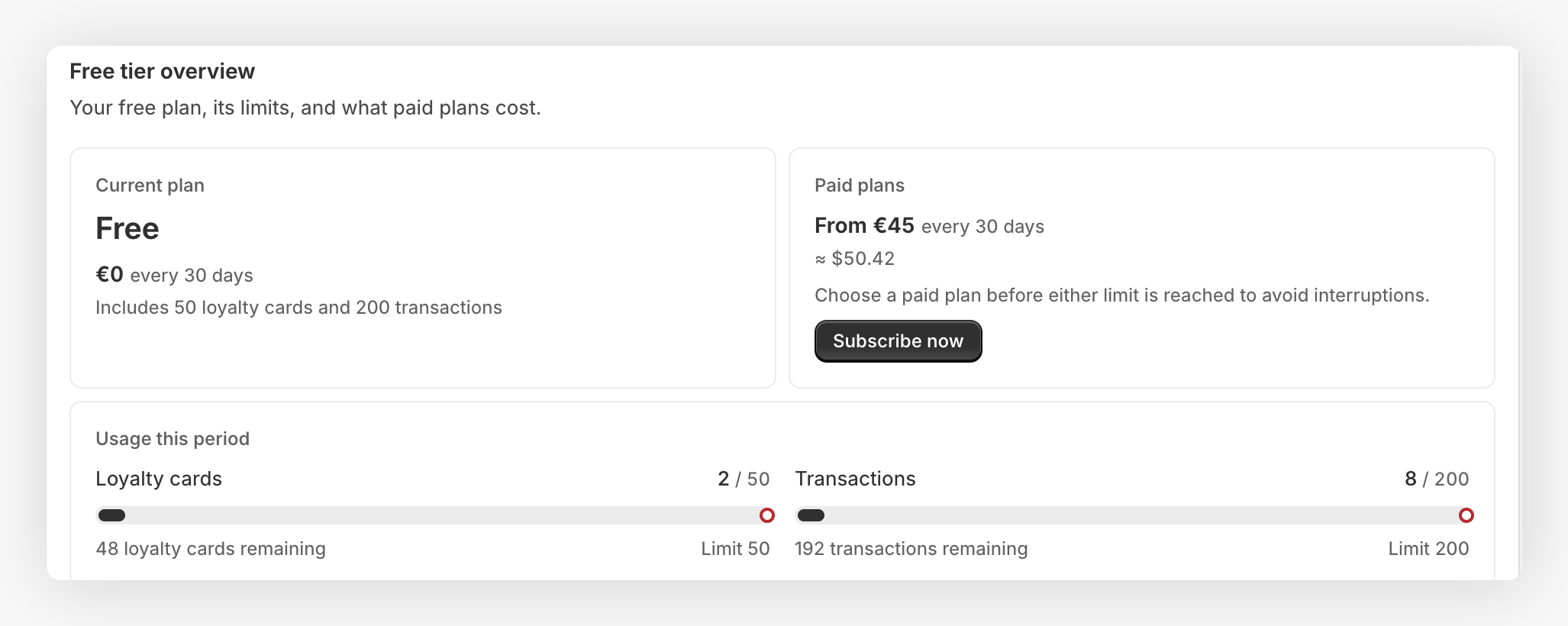
Free usage includes 200 identifiable transactions. Paid plans include a base number of identifiable transactions per billing cycle. If you go over that limit, extra transactions are billed in blocks of 100:
| Plan | Included identifiable transactions | Overage rate |
|---|---|---|
| Growth | 750 per cycle | €20 per 100 transactions |
| Advanced | 4,000 per cycle | €8 per 100 transactions |
| Enterprise | Custom | Volume discounts available |
Example (Advanced Plan): If your store processes 4,250 identifiable transactions in a billing cycle, the first 4,000 are included. The remaining 250 trigger 3 blocks (partial blocks count as full), so the overage is 3 × €8 = €24 extra for that cycle.
Usage caps 
Growth and Advanced plans include a cap on the Shopify usage charge. The cap is separate from the recurring plan price:
| Plan | Recurring price | Usage cap |
|---|---|---|
| Growth | €45 | €100 |
| Advanced | €145 | €200 |
| Enterprise | Custom | Negotiated |
The usage cap is applied to the usage line item before the recurring price is added. It is fixed by the Growth or Advanced plan; Enterprise merchants use the cap agreed for their subscription.
JeriCommerce values usage from the latest 30 days before applying the plan's cap. It checks that uncapped value against 75% of your approved Shopify cap, then classifies the warning based on the amount that would be submitted. Warnings can appear before Shopify has posted a usage charge.
| Status | What it means | What to do |
|---|---|---|
| Approaching | Uncapped 30-day usage has reached 75% of your approved Shopify cap. The amount submitted is still within that cap. | Review usage in Settings → Subscription and monitor the remaining allowance. |
| Exceeded | The amount submitted exceeds your approved Shopify cap. Shopify rejects the entire usage record, not just the excess. | Open Settings → Subscription and follow the cap increase flow, if your plan allows it. Approve the new limit in Shopify. |
| Plan outgrown | Your plan's ceiling reduces the submitted amount below uncapped usage. This can happen before usage reaches your approved Shopify cap. | Consider a higher plan. Raising the Shopify cap does not remove the plan ceiling. |
Growth and Advanced caps cannot be raised above their plan ceiling. A Plan outgrown email may therefore arrive without a cap increase option on the Subscription page: this status requires a plan change instead.
Want to estimate your next bill? Use the Pricing Calculator to see a breakdown based on your plan and usage.
Track Your Current Usage 
Go to Settings → Subscription in the JeriCommerce admin app. The page shows your loyalty card and identifiable transaction usage together.
On the Free tier, each usage bar shows how much you have used and how many loyalty cards or transactions remain. Use this information to upgrade before either free limit interrupts new activity.
On a paid plan, the page shows:
- Current usage against the amount included in your plan.
- Any additional usage blocks already reached.
- The threshold and price of the next block.
- An estimated total for the current billing cycle based on current usage.
- The amount currently recorded by Shopify against your usage cap.
If a program has reached a Free plan limit, the Subscription page remains available so you can review the usage and choose a paid plan.
The Shopify amount can briefly lag behind the estimate while a new usage block is being processed.
Change your plan 
Click Subscribe now on the Free plan, or Change plan on a paid plan. The Choose plan page shows the included usage and charges. Choose a plan, click Continue to Shopify, and approve the subscription in Shopify.
Cancel Your Subscription 
You can cancel an active subscription from the same Settings → Subscription page.
Open the Subscription page
In JeriCommerce, go to Settings → Subscription.
Start the cancellation
In the subscription usage card, click Cancel subscription.
Confirm the change
Review the confirmation message, then click Cancel subscription again. JeriCommerce cancels the current recurring charge in Shopify and returns the program to the Free tier.
The change may take a few moments to appear. Free tier limits apply after the cancellation, and you can subscribe again at any time.