Need to know whether customers keep your card in their wallet and which campaigns bring them back? The Cards and acquisition and Campaigns tabs in Analytics answer both. Hover over any label with a dotted underline to read what it counts.
To choose the period, the comparison and how charts are grouped, see Loyalty Analytics.
Cards and acquisition 
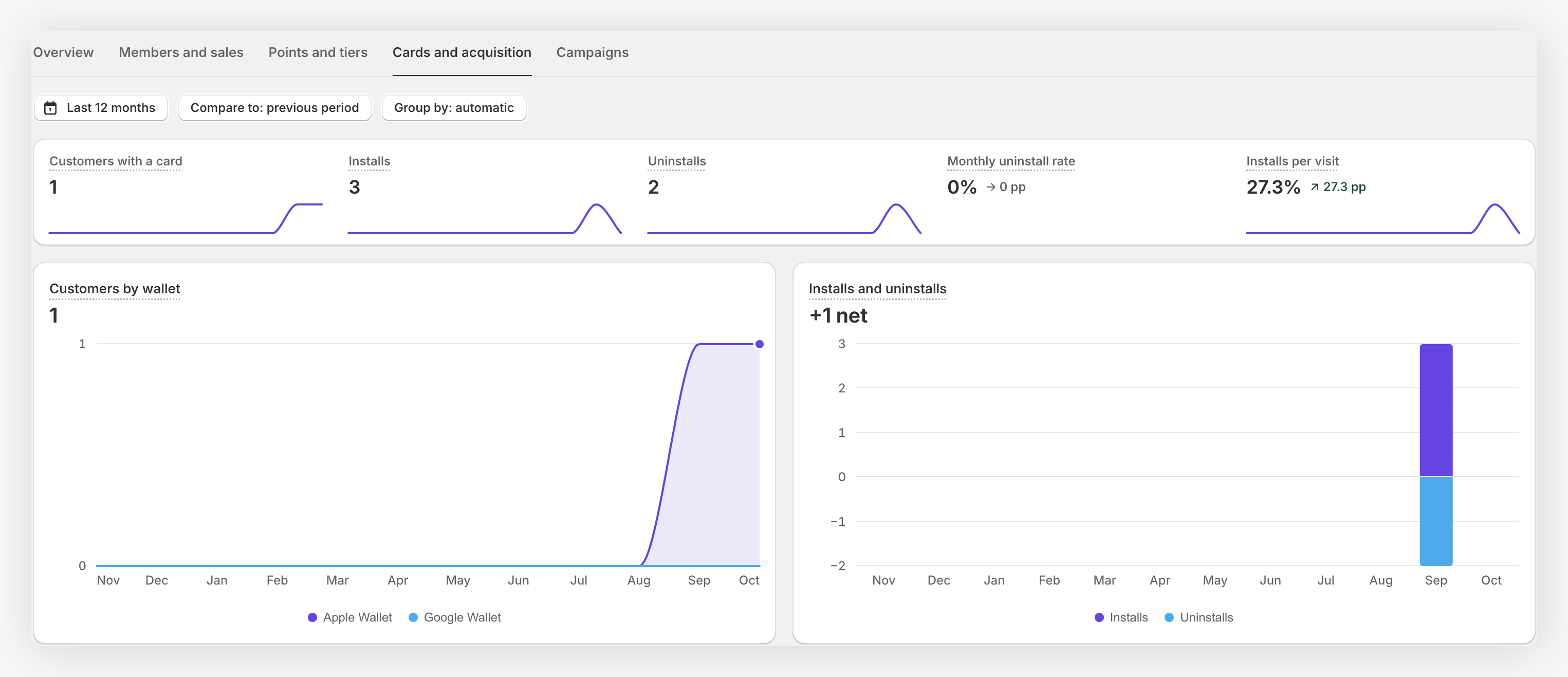
| Metric | What it counts |
|---|---|
| Customers with a card | Customers with at least one card installed at the end of the period. Each customer counts once, even with both wallets. |
| Installs | Customers who go from no card installed to having one. If they remove it and install it again, it counts again. |
| Uninstalls | Customers left with no card installed. |
| Monthly uninstall rate | Uninstalls over customers with a card at the start, scaled to 30 days. It isn't a churn probability. |
| Installs per visit | Card installs divided by visits to your web app. It doesn't follow each visitor, so it can go above 100%. |
- Customers by wallet: customers with Apple Wallet and Google Wallet. A customer can use both, so the two lines don't add up to the total.
- Installs and uninstalls: installs go up and uninstalls go down. The figure is the net change in customers with a card.
If uninstalls spike in a month, check the campaigns you sent then. Too many notifications in a short time is the most common cause.
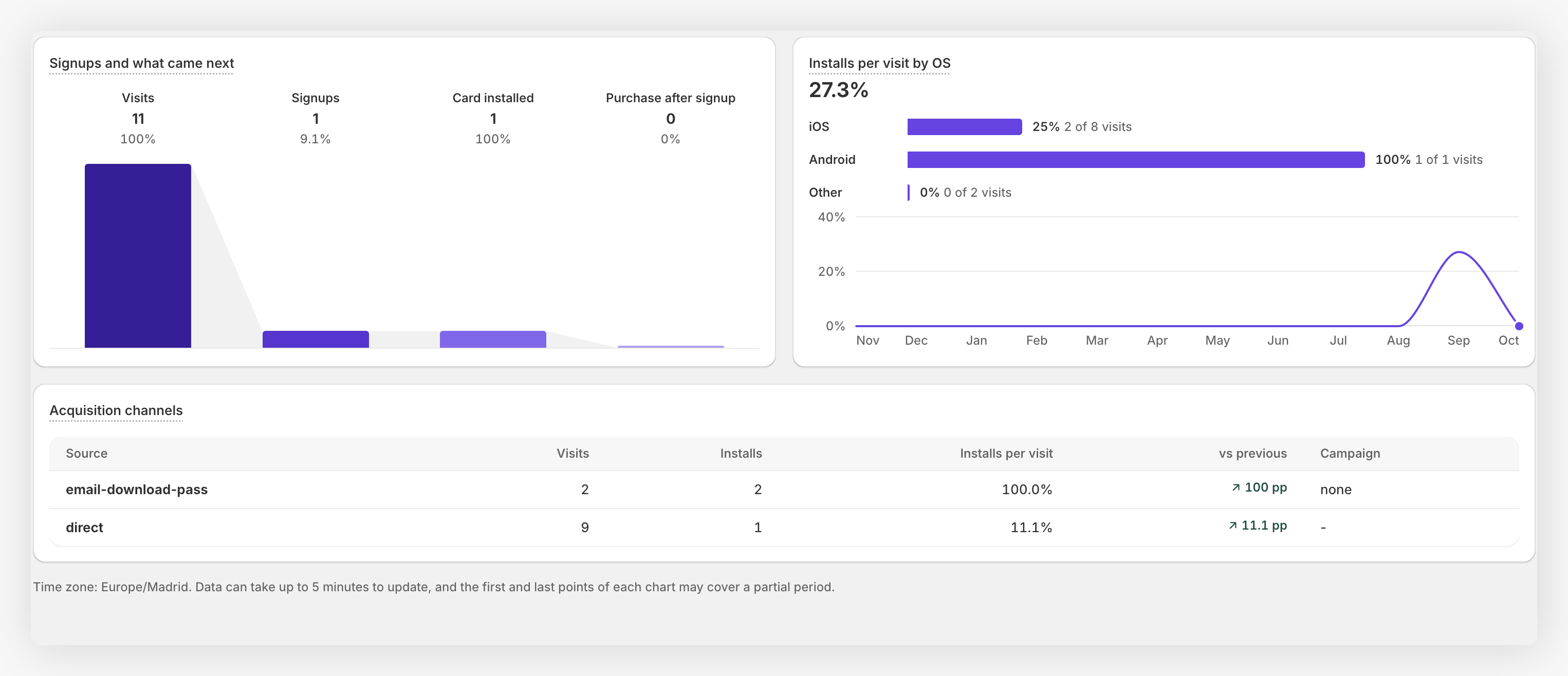
- Signups and what came next: visits in the period and the customers who signed up in your web app in that period, with how many installed the card and bought afterwards. The card and the purchase can come later, so it isn't a journey tracked person by person.
- Installs per visit by OS: the same rate for iOS, Android and other systems.
- Acquisition channels: the 20 channels with the most installs. Each install counts in one channel only: the UTM of the card itself, or the last visit before installing.
Campaigns 
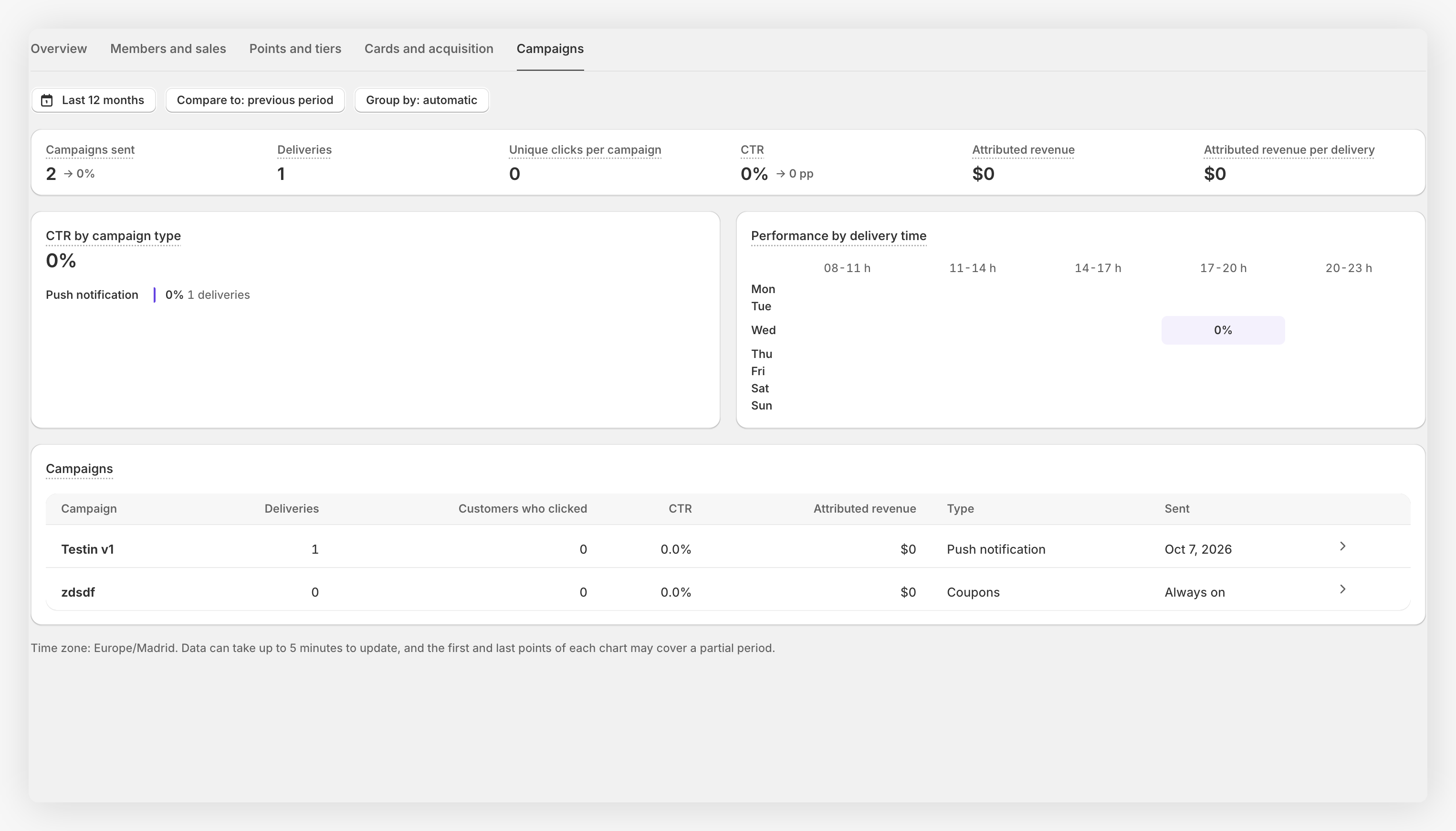
| Metric | What it counts |
|---|---|
| Campaigns sent | Campaigns with at least one notification in the period. |
| Deliveries | Updates the phone requested and received. It doesn't confirm they were read, and one person can get several. |
| Unique clicks per campaign | Customers who clicked each campaign, added up. Someone who clicks two campaigns counts twice. |
| CTR | Unique clicks over deliveries, weighted by deliveries. It can go above 100%. |
| Attributed revenue | Purchases assigned to the last campaign the customer clicked in the 7 days before buying. |
| Attributed revenue per delivery | Attributed revenue divided by deliveries. |
Attributed revenue doesn't subtract refunds, and it doesn't prove the campaign caused the purchase. Read it as a signal of which campaigns your buyers interact with, not as profit or return on investment.
- CTR by campaign type: compares location-based, push, dynamic link and coupon campaigns. The dashed mark is your average.
- Performance by delivery time: CTR by day and time of delivery, from 8:00 to 23:00. The audience and the content of each campaign also play a part, so use it as a hint, not a rule.
- Campaigns: your campaigns with their deliveries, clicks, CTR and attributed revenue. Click one to open it.
Gift card campaigns and deleted campaigns aren't included.
For Apple Wallet notifications, a delivery is recorded when the phone receives the updated card, not when the update is prepared in the background.
Performance of a single campaign 
Open a push notification, a coupon campaign or a gift card campaign to see its Performance block. It shows the campaign's figures since it started (the first 72 hours for push notifications) next to a benchmark from your other campaigns of the same type. Those campaigns can have different audiences and content, so treat the benchmark as context, not a target. Figures that don't apply to a campaign are hidden.
After each campaign, compare its CTR with the benchmark of its type. Repeat what works and adjust the timing of what doesn't.