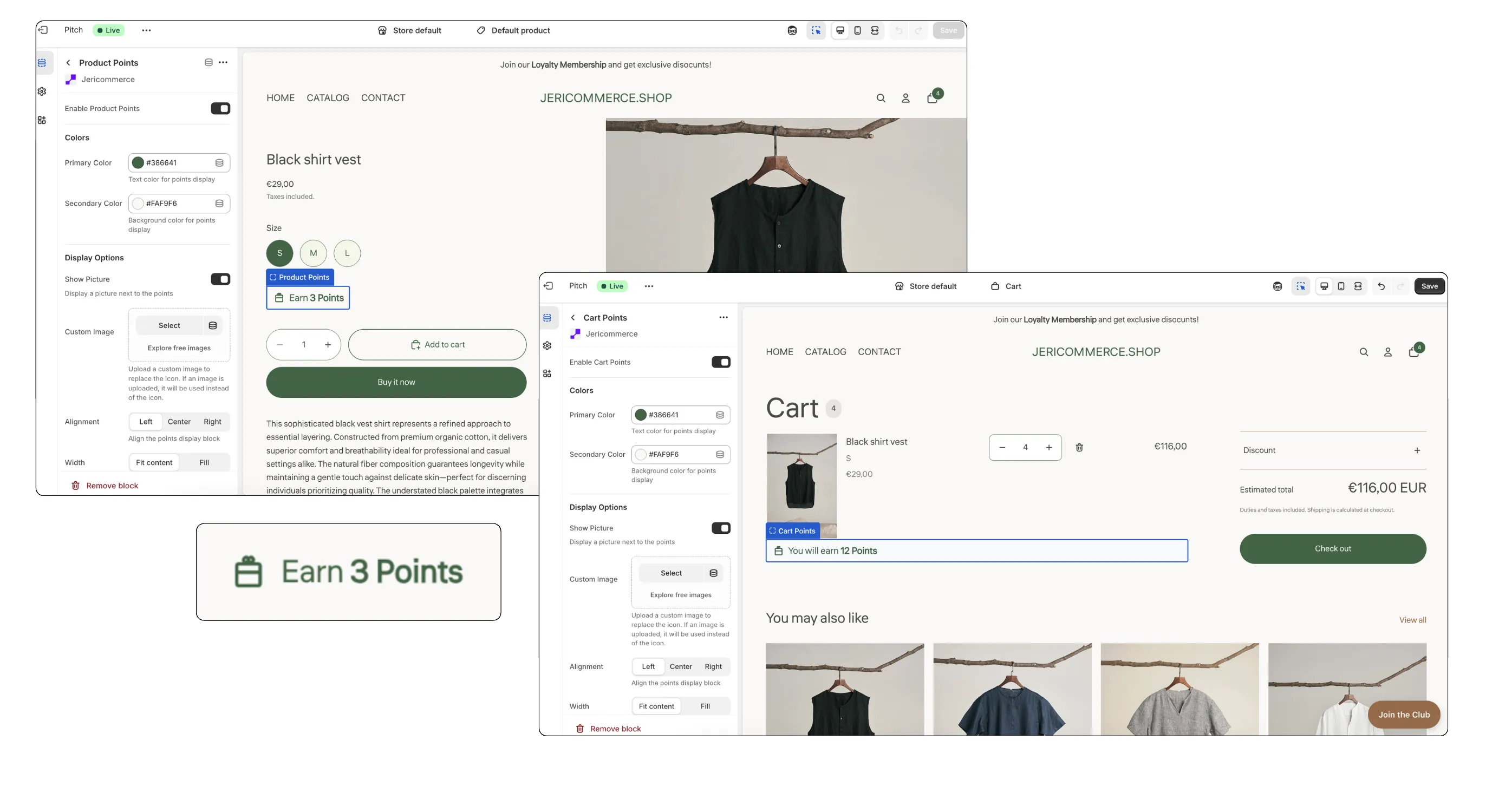
JeriCommerce provides Shopify App Extensions that show customers the value of their purchases in real time, encouraging higher conversion rates through point accumulation.
Product Page Extension 
This extension sits directly on your product pages. It calculates and displays exactly how many points a customer will earn for purchasing that specific item — showing the "cashback" value in loyalty points before they even add it to their cart.
Cart Page Extension 
The Cart Page extension displays the total points the customer will accumulate for their entire order.
- Real-time updates — As customers adjust quantities or add/remove products, the point total updates instantly.
- Checkout incentive — By showing the total reward for the complete basket, it encourages customers to finalize their purchase to claim their points.
How to Set It Up 
Both extensions are designed to blend seamlessly with your store's design while remaining easy to manage.
Native Integration 
These extensions are available as Shopify App Blocks:
- Product Page — Add as a block within the Product Information section.
- Cart Page — Add as a block within the Cart section.
This native approach lets you drag and drop the extensions to the exact position you prefer within those areas using the standard Shopify Theme Editor.
Customize the Look 
The display is fully customizable to match your brand. From the editor, you can change:
- Brand colors — Adjust text and background colors to match your theme.
- Icons — Choose or toggle icons that represent your loyalty program.
- Custom text — Edit the messaging (e.g., "Earn X points" or "Get X points with this order").
- Layout & position — Fine-tune the alignment and placement within the product or cart blocks.
Automatic Calculation 
No manual math needed — the extensions use your active earning rules and ratios to provide accurate, real-time data to the customer.
Boost Campaign Display 
When a Boost Campaign is active for purchase points, the product and cart points blocks can show the boosted value.
From the Shopify theme editor, use the Boosts settings on the block:
- Show Boost Badge — Shows an animated badge with the active factor, such as x2.
- Show Boosted Points Inline — Replaces the points amount with the base amount struck through and the boosted amount beside it.
You can also use these variables in the block text:
| Variable | What it shows |
|---|---|
[boost_multiplier] |
Active boost factor, such as x2. Empty when no boost applies. |
[base_points_amount] |
The pre-boost points amount. Empty when no boost applies. |